PILLAR 01Implemented in Prototype
Daily Report Architecture
Create one structured record for the complete delivery day.
- Report date
- Driver identity
- Assigned vehicle
- Start odometer
- End odometer
- Total mileage
- Daily completion state
FEATURED CASE STUDY • FUNCTIONAL PROTOTYPE
Daily medical-delivery operations generate critical information across vehicles, mileage, packages, stops, delivery zones, returns, transfers, STAT requests, and unexpected route conditions. When that information is fragmented across memory, messages, paper notes, or disconnected reports, operational visibility becomes difficult for both drivers and administrators.
Med-DayLivery translates firsthand operational insight into a structured low-code prototype designed to make daily reporting clearer, more consistent, and more accountable.
Independently conceived and developed by Dulain F. Charles. The prototype was not commissioned, funded, sponsored, owned, or formally adopted by an employer or healthcare institution.
Abstract representation of the Med-DayLivery operational reporting system. Illustrative only.
Project Snapshot
Primary users
Product purpose
Create one structured workflow for recording daily vehicle use, mileage, packages, stops, delivery zones, returns, transfers, STAT deliveries, exceptions, and administrative review.
Dulain’s contribution
The Operational Context
A driver may begin the day with one vehicle, a defined package count, multiple delivery zones, time-sensitive stops, and a planned route.
During the day, conditions may change. A vehicle may become unavailable. A replacement vehicle may be used. Packages may be delivered, returned, or transferred. A STAT request may be added. Mileage may need to be connected to more than one vehicle. The operational record must explain not only how the day ended, but how the work was completed.
01
Mileage, packages, stops, zones, vehicles, and exceptions must reconcile within one daily record.
02
STAT requests and scheduled deliveries require clear status and execution tracking.
03
Vehicle problems, route changes, borrowed vehicles, package transfers, and partial continuation can alter the original plan.
04
The reporting workflow must remain practical for a driver completing the report after an operationally demanding day.
05
Administrators need consistent data that can be reviewed, compared, exported, and used for operational decisions.
The Challenge
A reporting system can fail in two opposite ways. It may collect too little information, leaving mileage, packages, vehicles, and exceptions difficult to reconcile. Or it may ask for so much information that drivers avoid, delay, or inconsistently complete the report.
The product challenge was to create a structured but practical balance between operational detail and real-world usability.
DIMENSION 01
Capture the operational information required to understand the day without creating unnecessary reporting burden.
DIMENSION 02
Connect packages received, delivered, returned, transferred, and remaining outcomes within one accountable record.
DIMENSION 03
Associate mileage with the vehicle or vehicles actually used during the delivery day.
DIMENSION 04
Document what changed, why it changed, and how the delivery work continued.
DIMENSION 05
Create one reporting structure that is usable by the driver and meaningful to the administrator reviewing it.
The Product Response
Med-DayLivery was structured around the complete daily reporting lifecycle rather than one isolated function. The prototype connects day setup, vehicle information, mileage, package reconciliation, stops, zones, STAT activity, exceptions, submission, review, and export.
Create one structured record for the complete delivery day.
Track how packages move from receipt through delivery, return, or transfer.
Record the operational structure of the route beyond mileage alone.
The verified prototype currently reconciles total stops with boxes received according to the existing reporting logic.
Capture time-sensitive delivery requests and their completion status within the daily report.
Connect mileage to the vehicle used and support more accurate review of operational movement.
A same-day multi-vehicle workflow is under Active Refinement to support drivers who begin the day with one vehicle and continue with a borrowed or replacement vehicle — with per-vehicle odometer ranges, per-vehicle mileage, a combined daily total, and documented reason for change.
Provide administrators with structured records, vehicle and driver management, reporting controls, and exportable operational information.
Driver Workflow
The workflow represents the current prototype structure. It does not imply integration with a pharmacy, hospital, dispatch platform, or healthcare database.
The driver opens or creates the report for the delivery date.
The report connects the delivery day to the responsible driver and assigned vehicle.
The starting odometer establishes the day’s mileage baseline.
The initial package count creates the reconciliation foundation.
The driver completes scheduled stops, delivery zones, and any added STAT activity.
Undelivered packages, transferred boxes, vehicle problems, and operational changes are documented.
The ending odometer and operational totals complete the daily record.
The report becomes available for review, statistics, rates, and export.
Exception Design
The most valuable product requirements often emerge from unexpected field situations. Med-DayLivery treats exceptions as operational data rather than informal explanations added after the fact.
EXCEPTION 01
Active RefinementRecord that the assigned vehicle became unavailable during the route and document the operational consequence.
Product need
EXCEPTION 02
Active RefinementSupport the same driver continuing the delivery day with another vehicle.
Product need
EXCEPTION 03
Implemented in PrototypeDocument packages transferred to another driver or operational resource when the original route cannot continue as planned.
Product need
EXCEPTION 04
Implemented in PrototypeExplain how much of the route was completed, what remained unresolved, and how the packages were ultimately handled.
Product need
Dulain’s Contribution
The product did not begin with a generic software template. It began with recurring operational questions observed during daily medical-delivery work. The contribution connected firsthand field experience with structured product development.
Identified recurring reporting needs, accountability gaps, exception cases, and workflow conditions through direct delivery experience.
Translated operational friction into clear product problems involving mileage, packages, stops, vehicles, STAT activity, and reporting consistency.
Defined fields, rules, relationships, statuses, administrative needs, and exception scenarios.
Structured the reporting sequence around the driver’s actual day and the administrator’s review needs.
Used low-code tools and database configuration to move the product from concept to functional prototype.
Used real operational scenarios to identify limitations, test reporting logic, and guide continued product improvement.
Two Operational Perspectives
Driver perspective
Administrator perspective
The product becomes useful when driver usability and administrative accountability reinforce each other.
Administrative System
Administrative capabilities describe verified prototype functions. No fabricated analytics, weekly totals, driver records, or vehicle identifiers are shown.
Reporting Logic
RULE 01
Distance without vehicle context creates incomplete operational information.
RULE 02
Received, delivered, returned, and transferred boxes must form a coherent daily record.
RULE 03
Stops, zones, packages, and STAT activity should be understandable together.
RULE 04
Vehicle changes, transfers, breakdowns, and partial completion should not disappear inside a general note.
RULE 05
Reports should support comparison, rates, weekly review, and export without rewriting the driver’s information manually.
Reporting logic is operational, not legal, regulatory, medical, or billing-compliance in nature.
Privacy-Aware Design
PRINCIPLE 01
Collect only the information required for delivery reporting and accountability.
PRINCIPLE 02
The portfolio case study must not expose patient names, medical conditions, prescription details, or personal stories.
PRINCIPLE 03
Real delivery addresses must not appear in public screenshots or evidence.
PRINCIPLE 04
Driver and administrator functions should remain separated according to operational responsibility.
PRINCIPLE 05
Future screenshots must use redaction, anonymization, or approved demonstration data.
PRINCIPLE 06
Operational decisions and exception interpretation remain human responsibilities.
HIPAA compliance is not claimed. No HIPAA badge is displayed. Any regulatory conformance would require independent legal and technical assessment.
From Field Insight to Functional Prototype
Identify recurring tasks, reporting friction, and accountability needs.
Separate operational symptoms from the underlying workflow issue.
Define fields, users, relationships, rules, statuses, and exceptions.
Organize the sequence around how drivers and administrators actually work.
Translate the workflow into a functioning low-code product.
Use realistic reporting conditions and exception cases to identify weaknesses.
Adjust logic, fields, interface behavior, and product architecture as new operational needs emerge.
Selected technologies
Presented as supporting tools. No endorsement or partnership with technology companies is implied.
Method in Practice
Med-DayLivery illustrates several dimensions of The Dulain Method™.
LISTEN
Observe the driver’s daily experience, reporting burden, exceptions, and accountability needs.
UNDERSTAND
Clarify how drivers, vehicles, packages, stops, mileage, STAT activity, and administrators connect.
ANALYZE
Identify workflow gaps, data relationships, exception scenarios, and administrative requirements.
ALIGN
Connect driver usability with administrative visibility and operational accountability.
DESIGN
Structure fields, rules, user roles, reporting sequence, and exception logic.
IMPLEMENT
Develop the low-code prototype and database-supported workflow.
STRENGTHEN
Refine reporting structures, admin tools, exports, and reusable product logic.
SUSTAIN
Create a foundation for continued product testing, workflow improvement, and future responsible deployment.
Current State
Implemented in prototype
Active refinement
Med-DayLivery remains a Functional Prototype. It is not commercially launched, institutionally deployed, used by an employer, pharmacy, or hospital, connected to patient data, or certified for regulatory compliance.
Product Evidence
These interface views document the prototype’s reporting, accountability, and administrative architecture. All visible values are test data.
Prototype interface shown with test data.
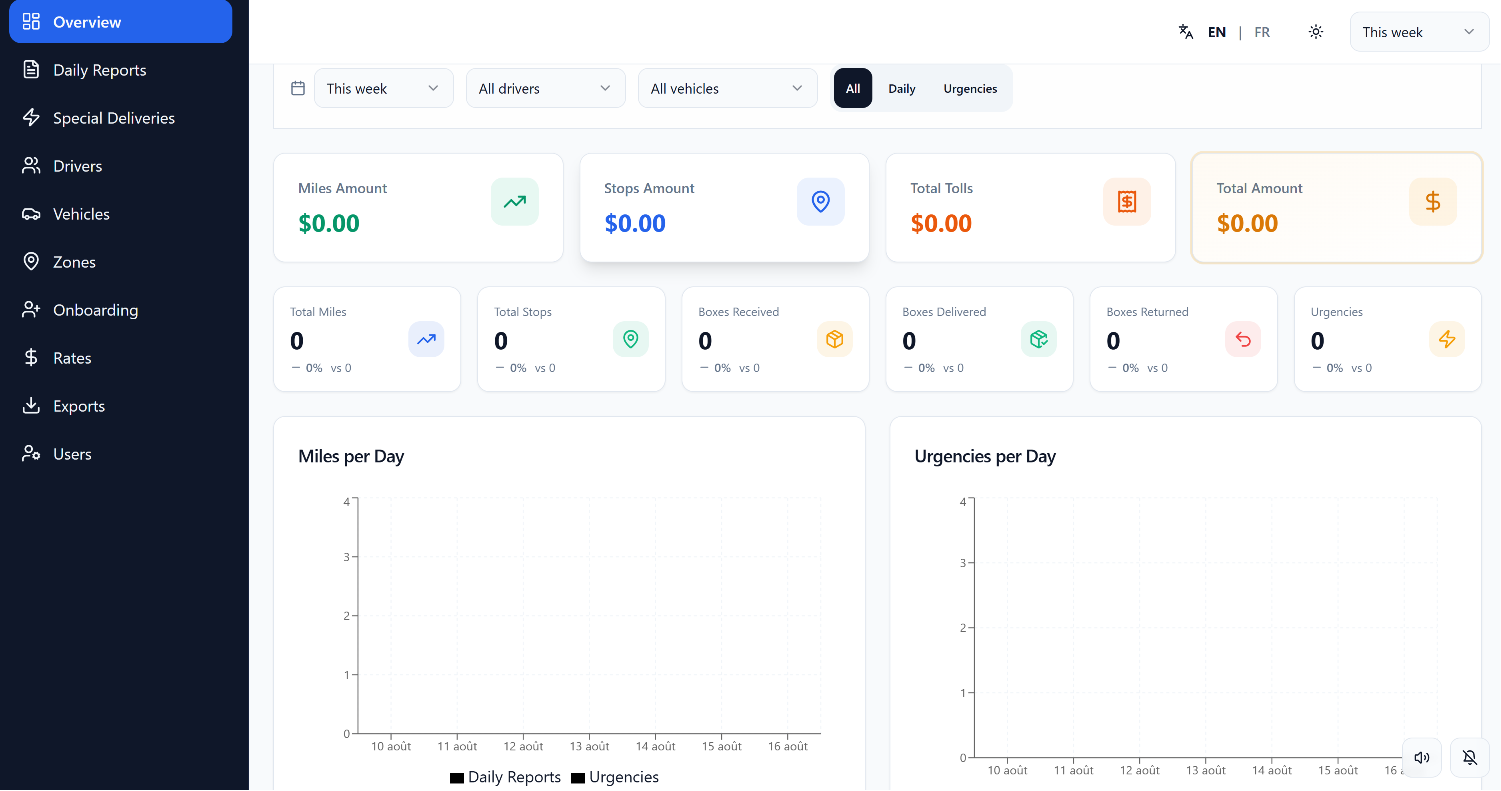
Administrative analytics dashboard designed to consolidate mileage, stops, box movements, returns, urgent deliveries, financial amounts, and operational trends.
Prototype interface shown with test data.
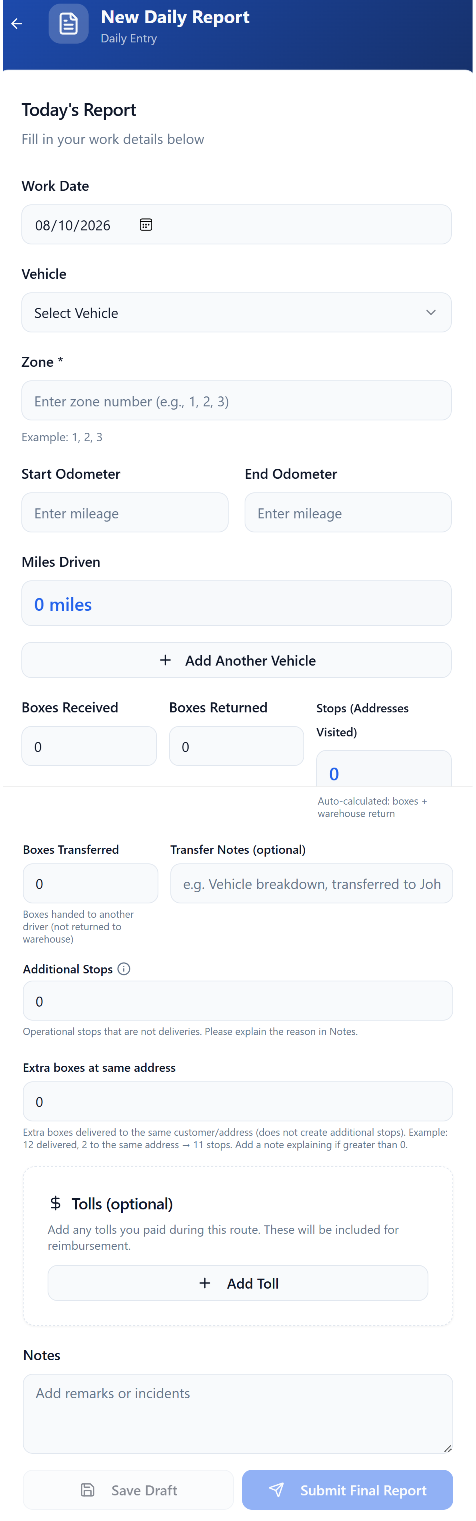
Structured daily reporting workflow for capturing work date, vehicle use, zones, mileage, boxes, stops, transfers, tolls, operational notes, and final submission.
Prototype interface shown with test data.
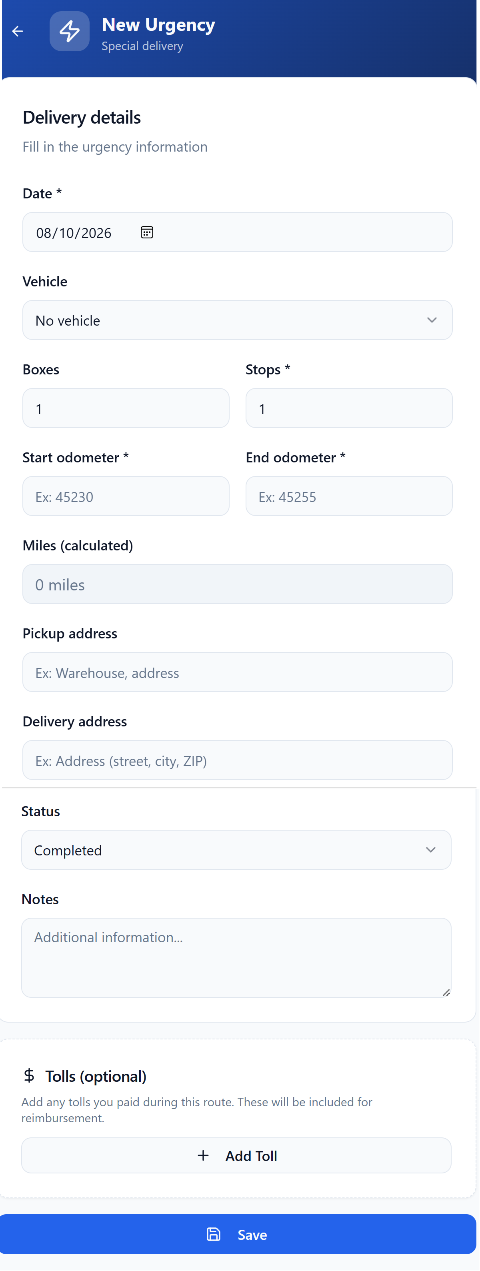
Structured special-delivery workflow for capturing date, vehicle state, box and stop counts, mileage, pickup and delivery information, completion status, notes, and tolls.
Prototype interface shown with test data.
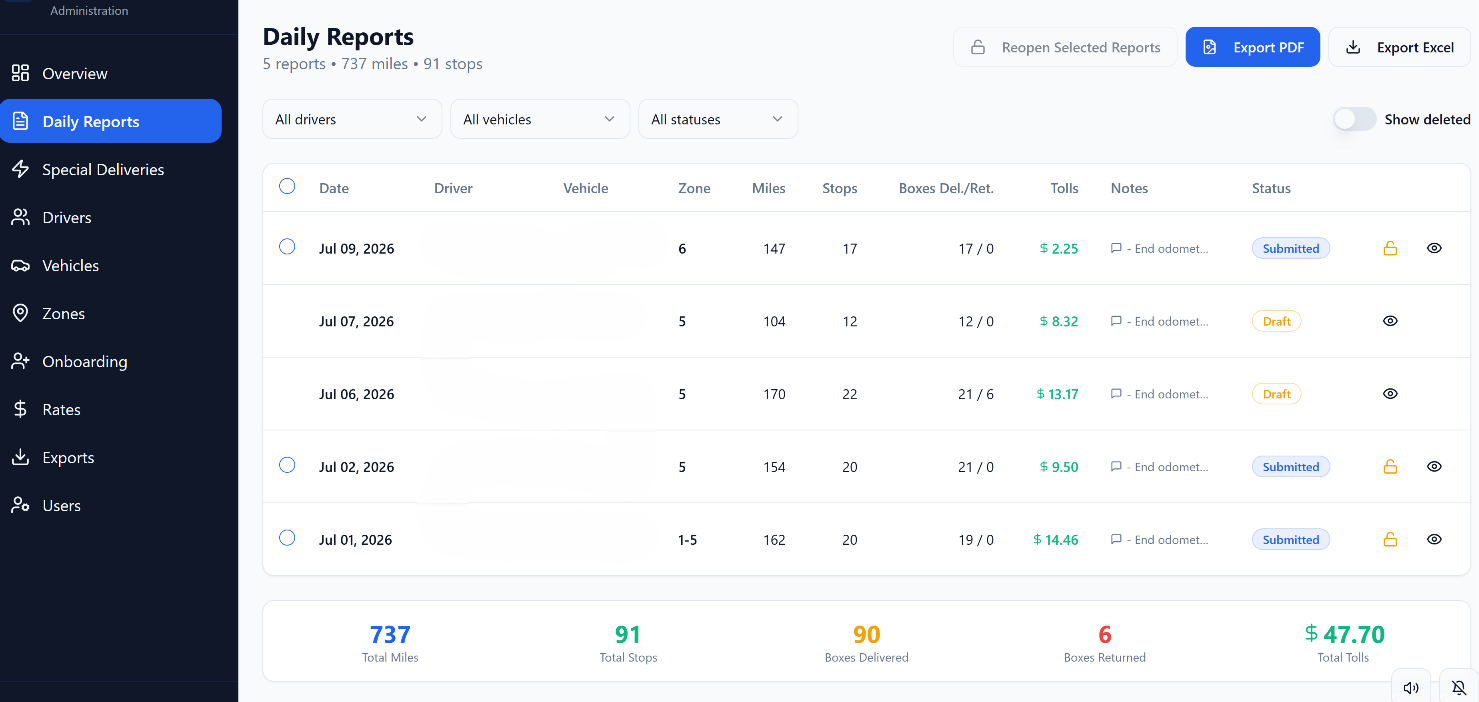
Administrative report view supporting status tracking, mileage and stop accountability, delivered and returned box totals, toll review, export, locking, and controlled report reopening.
Prototype interface shown with test data.
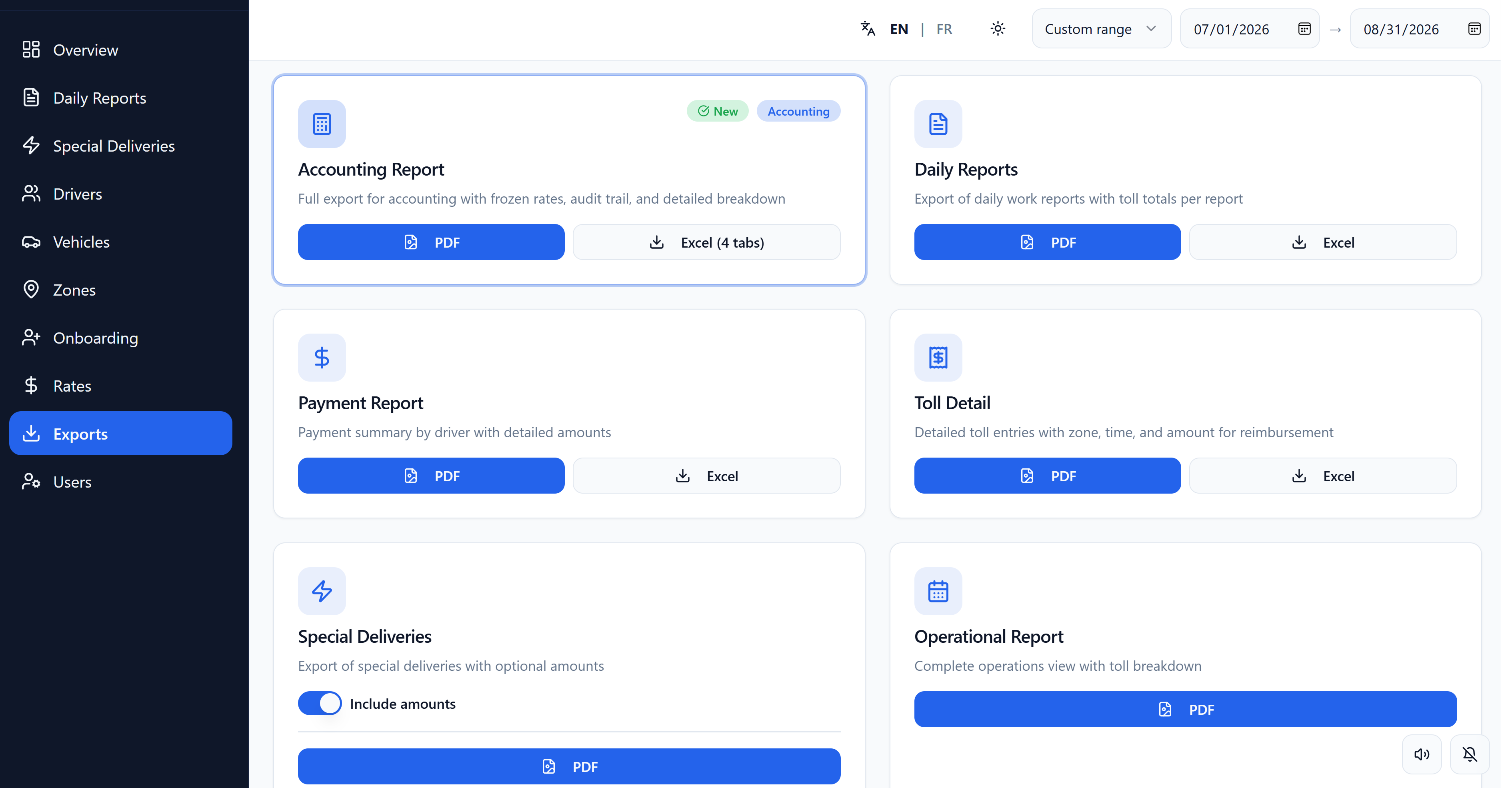
Reporting and export layer supporting accounting, daily operations, payments, toll details, special deliveries, and operational reporting in PDF and spreadsheet formats.
Prototype interface shown with test data.
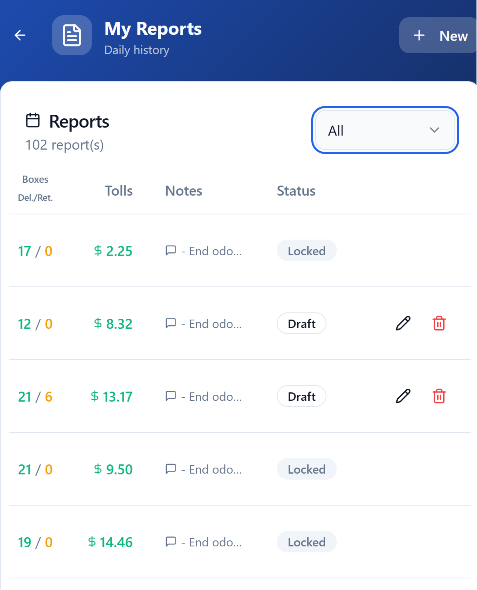
Driver-side report history showing draft versus locked states, report values, tolls, notes, and controlled editing behavior.
Prototype interface shown with test data.
Additional verified evidence may be connected after validation and publication approval.
Professional Value
Translating firsthand delivery observations into structured product requirements and reporting logic.
Designing a reporting workflow that serves both driver usability and administrative accountability.
Sequencing daily reporting from vehicle assignment through submission for review.
Defining fields, relationships, statuses, exceptions, and administrative needs from operational reality.
Moving from concept to functional prototype using low-code tooling and structured database logic.
Connecting mileage, vehicles, packages, stops, STAT activity, and exceptions inside one coherent record.
Lessons
LESSON 01
Daily operational work exposes reporting needs and exception scenarios that may not appear in a generic software specification.
LESSON 02
Vehicle breakdowns, replacement vehicles, package transfers, and partial routes should be designed into the reporting system rather than treated as rare notes.
LESSON 03
A report must be practical to complete and structured enough to support meaningful review.
LESSON 04
Mileage, vehicles, packages, stops, and exceptions become useful when their relationships are clearly defined.
LESSON 05
The value of the prototype includes its ability to reveal new requirements and guide increasingly accurate product decisions.
Related Pathways
Expertise
Explore the product, workflow, and systems capabilities behind the project.
Method
Understand the methodology connecting observation, analysis, design, implementation, and refinement.
Contact
Discuss an operational workflow or digital-product challenge.
From operational friction to product logic
Let’s examine the users, steps, data, exceptions, accountability needs, and implementation conditions — and translate them into a practical digital system.